
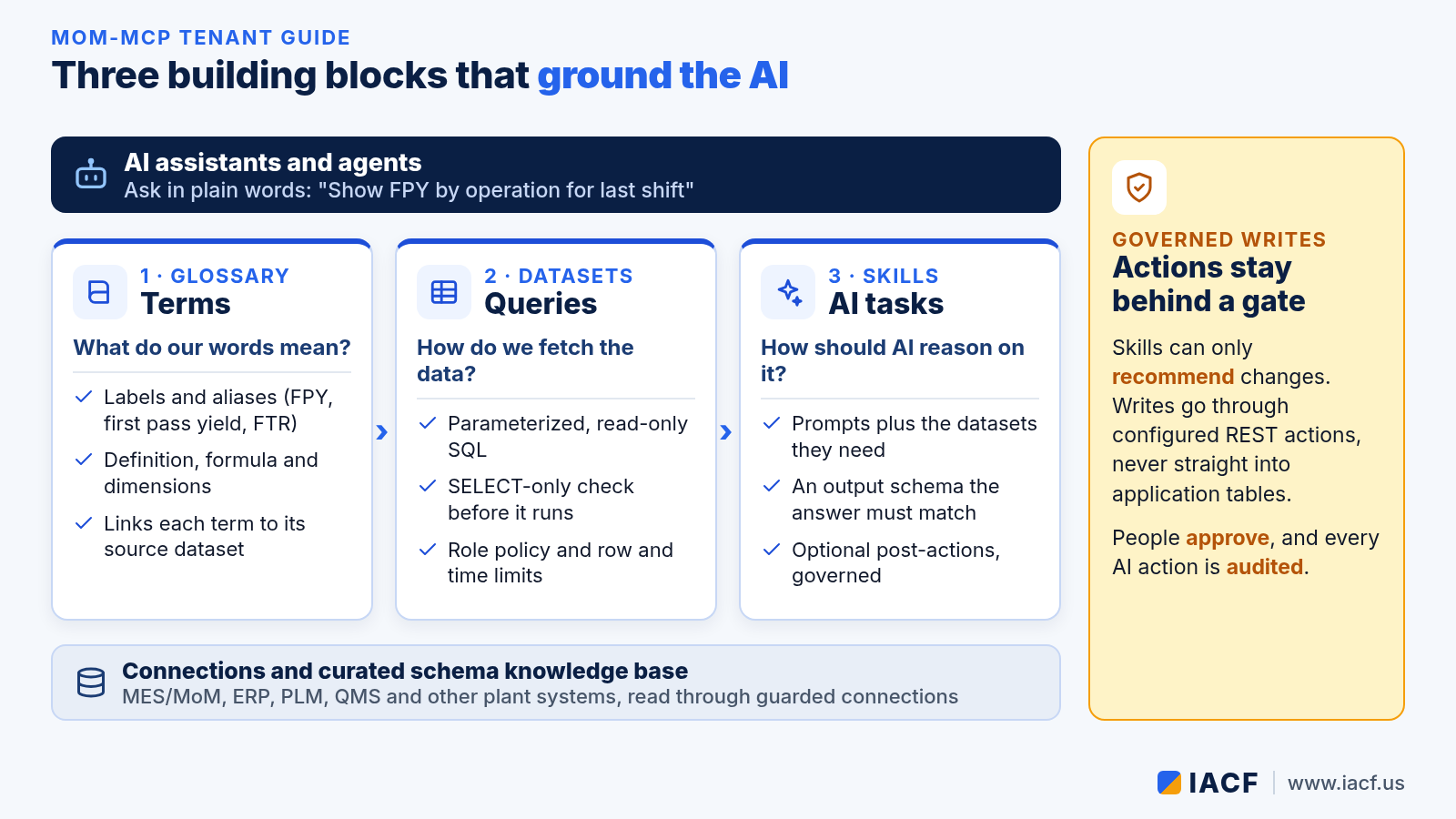
When an AI assistant answers a question about your plant, two things decide whether you can trust the answer: does it understand your words, and does it get its numbers from the right place? In IACF’s MoM-MCP, that grounding lives in three building blocks that every tenant is configured with: the glossary, datasets and skills. MoM-MCP is the bridge between AI and large language models (LLMs) and the manufacturing applications a plant already runs: MES/MoM, ERP, PLM, CRM, QMS and others.
This guide explains what each block does, how they fit together, and how to change them safely. If you haven’t set up MoM-MCP yet, start with choosing an edition and connecting an AI assistant.
Where the building blocks live
A MoM-MCP tenant is one plant, site or business unit, configured mostly in readable YAML files. Next to its connections and a curated schema knowledge base, each tenant has three folders that matter most to the AI: glossary, datasets and skills. The connections say where the data lives, and the knowledge base describes the tables in business terms.
1. The glossary: what your words mean
Every plant has its own vocabulary. One team says “FPY”, another says “first pass yield” or “first time right”. A glossary entry captures a business term once, with:
- Labels and aliases, so any of those phrases resolve to the same term.
- A plain-language definition, so the AI explains the KPI the way your quality team does.
- A formula, dimensions and grain, such as by resource, operation, product family or shift.
- A source dataset, which links the term to the query that actually computes it.
AI clients use it through MCP tools to search the glossary and resolve a term. The glossary also feeds MoM-MCP’s natural-language-to-SQL feature as reference material, which helps generated queries use your definitions instead of a guess.
2. Datasets: how the data is fetched
A dataset is a named, parameterized query against one connection, for example “OEE by resource, daily” with a resource and a number of days as inputs. Datasets are the only way curated numbers reach the AI, and they come with guardrails built in:
- Read-only by design. Each query is checked to be a SELECT statement before it runs, not just restricted by database permissions.
- Role policy. Each dataset lists the roles allowed to run it, so an AI persona, a planner and a supervisor can see different things.
- Guarded connections. Row limits and statement timeouts protect the source systems.
- Drill-down. A dataset can declare drill-downs, so a dashboard or an assistant can move from a summary row to the detail behind it.
Assistants discover datasets with list and describe tools, then run them with parameters. You don’t have to expose one tool per query, so the tool list stays small and clear.
3. Skills: how the AI should reason
A skill is a reusable AI task, such as a KPI narrative, a shift handover summary, a quality root-cause analysis or a list of recommended actions. It combines a system prompt, a prompt template, the datasets it needs, and an output schema that the answer must match. It can also include post-actions.

Because a skill only works on the datasets it declares, its answer is grounded in governed, read-only data. Because its output is checked against a schema, a dashboard or flow can rely on the shape of what comes back. The model can be the assistant’s own, called through MCP sampling, or a server-side LLM you choose; see bring your own LLM, or none at all.
Post-actions never write straight into application tables. A skill can recommend a change, such as rescheduling a work order or creating a maintenance order. The change then goes through a configured REST action, a person’s approval and the audit trail. The same skill can be called by an AI assistant, a dashboard insight or action panel, a scheduled job, or a step in the MoM-MCP flow engine.
You don’t have to write every skill yourself. MoM-MCP ships a platform skills repository with ready-made skills for areas such as KPI narratives, shift handover, quality root cause, material risk, maintenance and scheduling. Administrators can see which skills are installed, available or outdated for a tenant, and install or remove them. Per-user permissions decide who can run which skill.
Start from a template, then make it yours

Most tenants don’t start from an empty folder. A vendor template, for example for a DELMIA Apriso version, brings a schema knowledge base, glossary terms, datasets and skills. An industry template, such as the aerospace and defense pack, adds role dashboards and more terms. The tenant’s own files sit on top: when you define a term, dataset or skill locally, your version wins. Some details merge instead of replacing. For example, an alias or a column you add to a table is kept alongside the vendor’s.
Changes are versioned. A definition can be a draft while you work on it, a prototype that already runs as the default while you adjust it, active once it is frozen, or archived when it is retired. To change an active definition, you create a new version, so what’s running in production never changes by accident.
A practical order of work
- Connect and describe. Add read-only connections and check that the schema knowledge base covers the tables you need.
- Agree on the words. Review the template glossary with operations, quality and maintenance, and add your own terms and aliases.
- Curate the datasets. Start with the KPIs people ask about most, set role policies, and use the admin test button to run each one.
- Add skills. Install skills from the repository first, then write tenant-specific ones where your process differs.
- Promote with care. Run new definitions as prototypes, review the results, then mark them active.
Get help setting up your tenant
Want to map your plant’s terms, KPIs and AI tasks onto MoM-MCP? Visit www.iacf.us or email info@iacf.us.
Leave a Reply